![nb-tao-logo.svg]](https://knowledge.taotesting.com/hubfs/nb-tao-logo.svg)
How to prepare items for TAO Grader
When creating items for human grading in TAO, the most important concept is the scoring trait. In TAO Authoring, scoring traits are configured as Outcome Declarations. An item must contain at least one valid scoring trait in order for its responses to appear in TAO Grader. An item can include as many traits as needed, for example to score grammar, fluency, understanding, or word choice separately.
1. The core rule
For an item to be available in TAO Grader, it must include at least one valid scoring trait. If no valid trait is present, the item responses will not be displayed for graders.
This is the first thing to verify when an item does not show up in human grading workflows.
2. Where to configure scoring traits
Scoring traits are created from the item authoring interface:
-
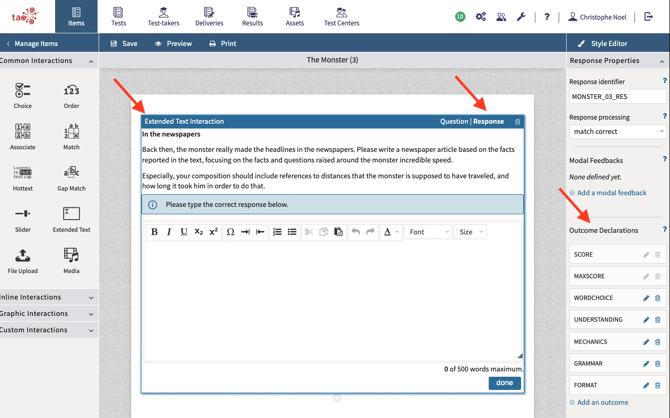
select an interaction
-
enable Response mode
-
scroll to the Outcome Declarations panel
Although this panel is accessed through an interaction, the trait itself is created at the item level.
3. What a scoring trait contains
Each scoring trait includes several fields that directly affect grading behavior.
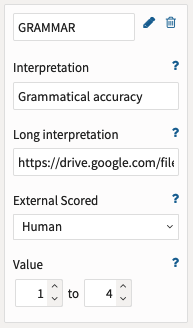
Identifier
The identifier is the technical name of the trait and is used to identify the grade in the results.
Interpretation
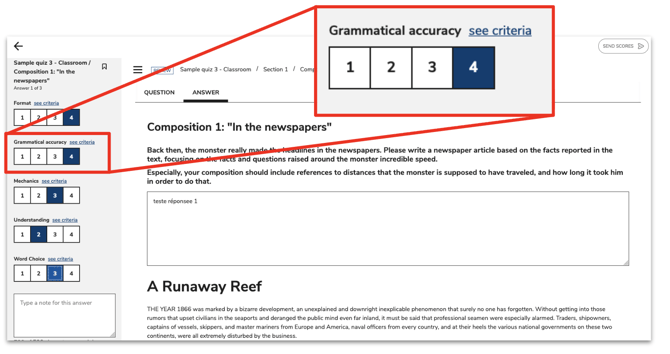
This is the label shown to graders in the TAO Grader interface. It should therefore be clear and user-friendly.
Long interpretation
This field contains a link to a hosted PDF rubric. In TAO Grader, that rubric is opened through the see criteria link.
External Scored
This value should be set to Human.
Value
This defines the score range available to graders. For example, a value range from 1 to 4 produces four grading buttons: 1, 2, 3, and 4.
4. What makes a scoring trait valid
A scoring trait must use a valid score range. A valid range:
-
uses integer values only
-
does not use decimals
-
has a minimum lower than the maximum
-
has a maximum greater than 0
If the score range is invalid, the responses will not be displayed in TAO Grader.
5. Important clarification: grading is done at the item level
This is an essential point for authors to understand.
Outcome Declarations are created at the item level. Even though the configuration panel is accessed through an interaction’s Response mode, the trait is not tied to that interaction alone. Once created, it is available across the item. Human grades are therefore set for the item as a whole, not for one specific interaction inside the item.
This is especially important for complex items with multiple interactions: the grading model applies to the item, not interaction by interaction.
6. Rubric link requirements
When a rubric is provided through the Long interpretation field, the linked PDF must be:
-
publicly accessible
-
displayable in an iframe
For Google Drive files, the link should end with /preview rather than view or edit, otherwise the rubric will not display correctly in TAO Grader.
7. Key takeaway
In TAO, human grading depends on valid scoring traits. Those traits are configured as Outcome Declarations, they can represent different scoring dimensions, and they are applied at the item level. A clear setup of identifiers, labels, score ranges, and rubric links is what makes an item ready for TAO Grader.