![nb-tao-logo.svg]](https://knowledge.taotesting.com/hubfs/nb-tao-logo.svg)
Paper-based testing currently supports a restricted workflow.
The generated PDF is not a question booklet. It is a response sheet: a page containing a QR code, a header with identifying information, and a blank area where the test taker writes a handwritten response for the associated item.
Because of this, eligibility must be checked at three levels:
-
the item
-
the delivery
-
the Portal session
1. Item eligibility rule
For an item to be eligible for paper-based testing, it must meet all of the following conditions:
-
the item contains exactly one interaction
-
that interaction is an Extended Text Entry
-
that Extended Text Entry is configured in rich-text mode
Anything else makes the item ineligible for paper-based testing and will result in an error when trying to generate the PDF.
2. Delivery eligibility rule
A delivery is eligible for paper-based testing only if:
-
it contains at least one eligible item for paper-based testing
-
it does not contain:
-
branching rules
-
randomization
-
item shuffling
-
section shuffling
-
pre-conditions
-
dynamic selection
-
In other words, paper-based testing requires a static delivery structure. Any delivery logic that changes the path, order, or selection of content makes the delivery ineligible.
3. Portal session constraints
Even though this is not configured in authoring, the Portal session must also respect the following constraints:
-
the session cannot be linked to a battery
-
the session cannot be Public
So an item may be valid, and a delivery may be valid, but the workflow can still fail if the Portal session itself is not compatible.
4. Information available in the PDF header
The PDF header can include information that is already visible in authoring. The available fields are:
-
QTI item title
-
QTI item identifier
-
interaction response identifier
These fields do not all have to be displayed, since the header is customizable. But authors should know that these values may be used in the generated PDF and should therefore be set deliberately. In the sample below, the header includes the item title, item identifier, and response identifier, together with the candidate login and page number.
A good practical recommendation is to make sure the item title is clear and readable, since it is often the most useful field to display on the sheet.
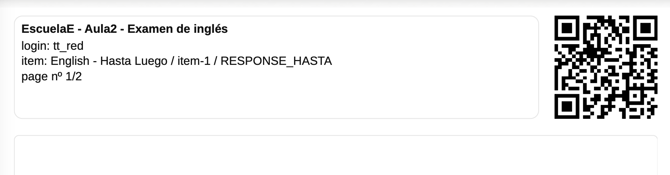
And the template that generated this header: